The update adds Video Panels for creating multi-view monitoring dashboards and introduces visual, no-code tools for configuring variable health states, composite variables, and grouped variables. It also includes contextual help videos and new integrations for Aurora ReAX and Stage Precision SP Grid.
Video Panels
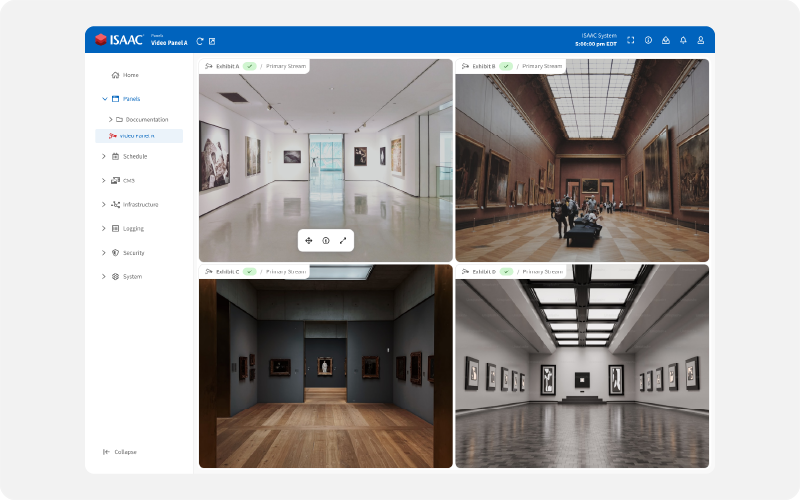
A new Panel type, Video Panel, is now available. With an intuitive layout editor and simple drag-and-drop stream assignment, operators can build multi-view video dashboards for security feeds, operational monitoring, and live situational awareness. Video Panels are powered by a new Asset type: Camera Assets.
Variable Health State Editor
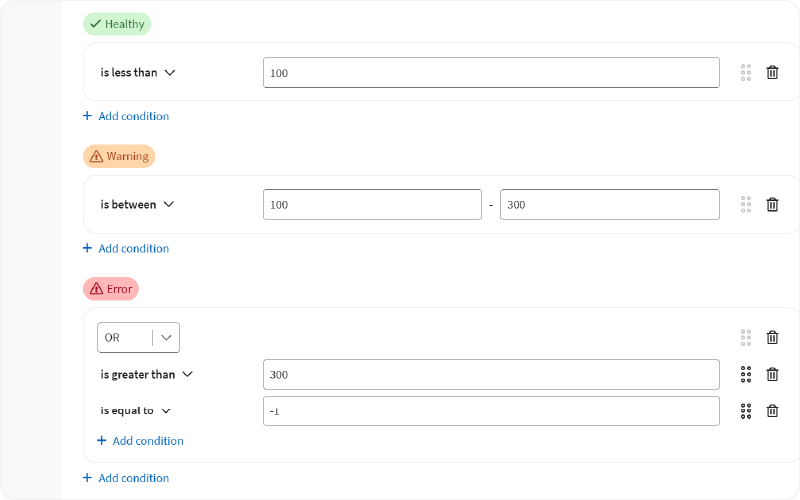
Variable and Composite Variable Health States can now be configured through a visual interface—no scripting required for most use cases. An Advanced Mode remains available for more complex logic when needed. Build clear conditions using familiar operators (numbers, text, dates, booleans) and combine them using AND / OR rules.
Automatic Variable Health State
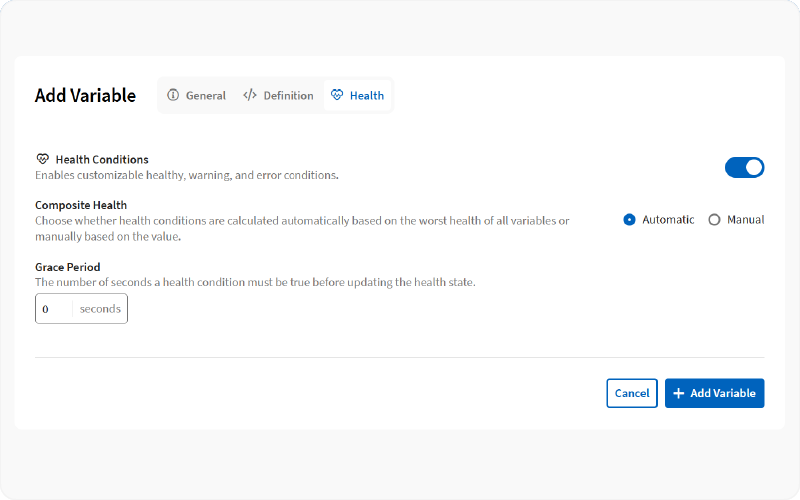
Composite Variable Health States now include an automatic mode that inherits the Health State of the referenced variables, simplifying configuration.
Simplified Composite Variables
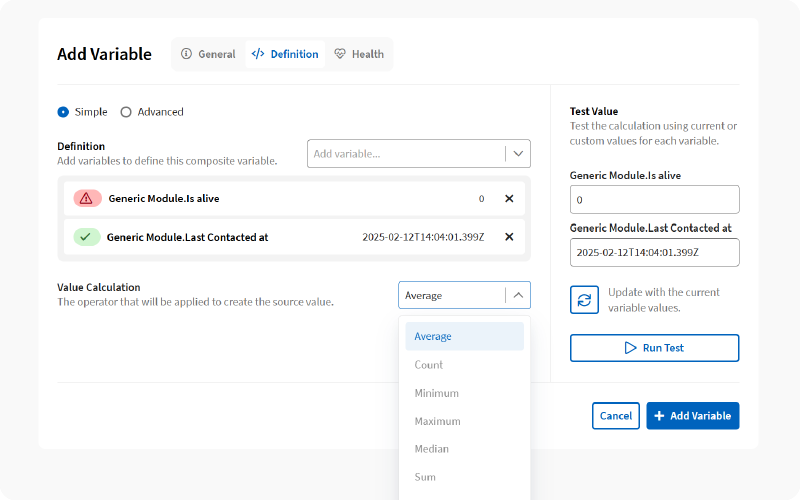
Composite Variables now offer a Simple Mode that automatically aggregates values from referenced variables using operators such as Average, Minimum, Maximum, or Sum. Advanced Mode remains available for more complex definitions using JavaScript. When using Simple Mode, referenced variables are clearly displayed in a structured list.
Variable Groups
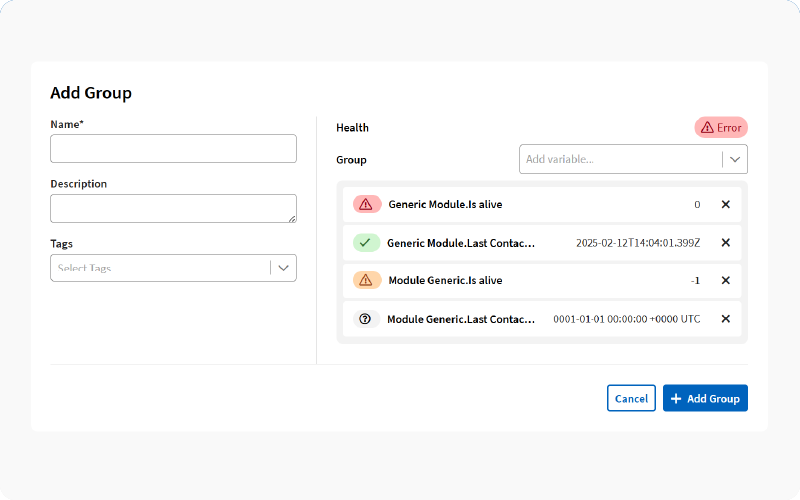
Variables can now be organized into Groups. Each Group automatically inherits its Health State from its member Variables, providing immediate high-level visibility without additional configuration.
Contextual Help video Capsules
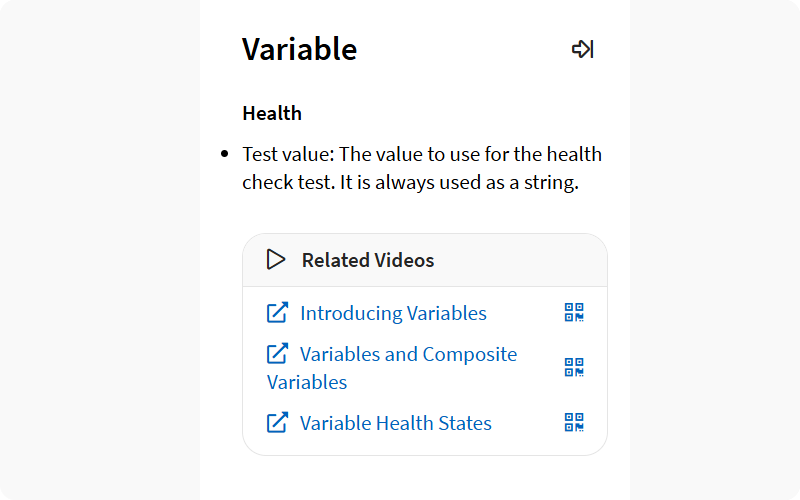
The Contextual Help menu now includes links to short video capsules explaining selected features. Each link includes a QR code, allowing quick access from any device.
Aurora ReAX
A new module has been added to support Aurora ReAX A/V controllers, a series of touch panel with beaming forming Dante/AES67 microphone and integrated speaker.
SP Grid
A new module has been added to support Stage Precision SP Grid, a solution for control, connectivity, calibration, automation, UI creation, and managing real-time 3D spatial data into a single workflow.
Full Changelog
New Features
Video Panels: A new Panel type, Video Panel, is now available. With an intuitive layout editor and simple drag-and-drop stream assignment, operators can build multi-view video dashboards for security feeds, operational monitoring, and live situational awareness. Video Panels are powered by a new Asset type: Camera Assets.
New Variable Health State Editor: Variable and Composite Variable Health States can now be configured through a visual interface—no scripting required for most use cases. An Advanced Mode remains available for more complex logic when needed. Build clear conditions using familiar operators (numbers, text, dates, booleans) and combine them using AND / OR rules.
Variable Health State Automatic Mode: Composite Variable Health States now include an automatic mode that inherits the Health State of the referenced variables, simplifying configuration.
Simplified Composite Variables: Composite Variables now offer a Simple Mode that automatically aggregates values from referenced variables using operators such as Average, Minimum, Maximum, or Sum. Advanced Mode remains available for more complex definitions using JavaScript. When using Simple Mode, referenced variables are clearly displayed in a structured list.
Variable Groups: Variables can now be organized into Groups. Each Group automatically inherits its Health State from its member Variables, providing immediate high-level visibility without additional configuration.
Contextual Help Video Capsules: The Contextual Help menu now includes links to short video capsules explaining selected features. Each link includes a QR code, allowing quick access from any device.
Aurora ReAX: A new module has been added to support Aurora ReAX A/V controllers, a series of touch panel with beaming forming Dante/AES67 microphone and integrated speaker.
SP Grid: A new module has been added to support Stage Precision SP Grid, a solution for control, connectivity, calibration, automation, UI creation, and managing real-time 3D spatial data into a single workflow.
Improvements
The Edit Variable and Add/Edit Composite Variable pages have been redesigned to improve navigation and usability.
With the introduction of Variable Groups, it is now possible to filter Variables by type: Module, Group, Composite, Platform, or Asset.
The Variable computation engine has been redesigned for significantly higher performance. The data ingestion pipeline has also been optimized, resulting in faster data processing, quicker condition evaluation, and more responsive Health State calculations.
Action Logs have been expanded to include activity tracking for Panels, Media Manager, Calendar, Document Center, ExpressLane logins, and System Power changes.
The System > Settings menu has been reorganized to improve accessibility to the different settings.
The Search Filter has been enhanced for Variables, Media Manager, and Activity Logs, improving the user experience. Filter options are now reflected in the page URL, making it easier to bookmark or revisit specific filtered views.
For Maps: Automatic ordering has been removed. Maps now appear in creation order by default and can be manually reordered. Maps in different folders can now share the same name.
Page scrolling has been improved for table-based views. Only the table content scrolls, while the page header (title, search field, filter button, etc.) remains accessible at all times.
A loading indicator has been added to the Media thumbnail preview dialog while previews are being generated.
The Template Editor validation has been improved to detect and show invalid fields before saving the Composition Template.
Network Switch Ports auto-mapping now supports Cisco NEXUS series switches.
Once a shutdown request has been initiated, the UI does not display intermediary error messages anymore, but instead displays the "shutdown page"
Network Switch Port 100gbps, 25gbps, 2.5gbps and 5gbps speeds have been added.
New video capsules links have been added in the Contextual Help pages for Express Lane, and Maps.
Bug Fixes
In the Calendar, when a day contains blocks, and the lengths of these blocks are changed in their own editors, the length of the blocks are not updated in the day unless they are removed and re-added [ISAAC-S-1898].
When a Playable duration is modified, Calendar items referencing that Playable are not updated, causing scheduling inconsistencies [ISAAC-S-1919].
In the Composition Editor, adding and then removing an item is preventing the Composition Template from being saved [ISAAC-A-3254].
The Platform page can take up to 30 seconds to reflect changes to listed items (VMs, Hosts, Clusters, Datastores) [ISAAC-S-1920].
Image Sequences do not display a preview in the Media thumbnail preview dialog [ISAAC-S-1969].
VNC Panels can report multiple connected users when only one user is active [ISAAC-S-2088].
When an Image duration is changed, associated Playable durations are not updated accordingly [ISAAC-S-2083].
Attempting to create a Zone that already exists fails silently without displaying an error message [ISAAC-A-3347].
When creating or editing BrightSign Player resolutions for HD225 models, the dropdown list includes unsupported resolutions [ISAAC-S-1938].
When a media is deleted, the schedule is not rebuilt correctly, when the media was part of a scheduled Playlist [ISAAC-S-2155].
Navigating into a folder whose name is a number (e.g. "11") throws a 404 error [ISAAC-A-3369].
When linking a marker to a map, the "Select Map" modal does not follow the custom sort order [ISAAC-A-3404].