
bars

Detect ceiling, surface, and human height temperature.
humidity
Detect ceiling and human height humidity.
walking
Detect if there is motion in the room.
Detect light level intensity.
waveform
Detect occupancy using sound from two on-board microphones.

Temperature Sensors
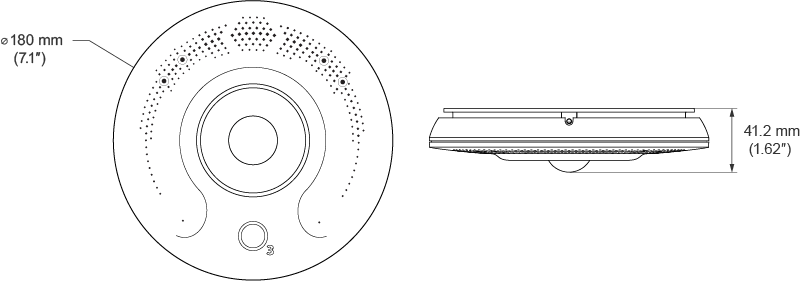
You can mount the O3 Edge to a ceiling tile, finished ceiling, or junction box.
Can I install the O3 outdoors?
The O3 is not rated for outdoor operation. The enclosure is intended for indoor use and its operational temperature range is 0°C to 45°C. The humidity range is 10% to 95% non-condensing.
What if I have a very high ceiling in my building? Can I mount the O3 higher than the recommended height?
The O3 has been tested and verified at heights between 2.4m and 4.5m (8ft to 15 ft). While being slightly higher should not be a problem, there is a practical limit. The higher the unit is mounted, the less responsive the IR temperature sensor becomes.
Can the O3 be mounted vertically, such as on a wall?
The O3 is designed for mounting on the ceiling, and is most effective mounted in a horizontal orientation, with a birds eye view of the space.
Can you sterilize or clean the O3?
The O3 plastic can be wiped down with an antiseptic cloth. The O3 should not be sprayed with any substance nor should it be submerged in any liquid for cleaning.
The O3 is actually modelling the occupant height temperature based on the readings it gets from the three internal temperature sensors. Two of the sensors are traditional temperature sensors. They are directly measuring air temperature up at the ceiling. The third sensor is an infrared sensor, which measures a large area directly underneath the sensor hub. This IR sensor covers an area that is roughly the diameter of the mounted height. For example, if you mount the unit on a 2.4 m (8 ft) ceiling, the IR sensor covers roughly a 2.4 m diameter. At 3 m (10 ft), it’s looking at 3 m diameter.
So it’s true, we’re not really measuring the temperature at occupant height. We’re modelling what the temperature will be down at the occupants level based on everything the sensor hub senses up on the ceiling.
Using a technique called Kalman filtering, we’ve produced a model for temperature measurements. We take the three temperature readings and feed them into the algorithm in real time. Each sensor reading is given a weighting towards the final temperature value. It’s not just the current measurements that matter, the previous temperature readings are also fed into the model with their own weighting.
By running this model constantly, we achieve two things. The O3 is able to respond to temperature changes much more quickly than a traditional thermostat while also rejecting noise - that is, sudden spikes in temperature due to random events. Using this approach, we get the best of both worlds. We see the temperature rise or fall as it’s really happening, without confusing the device because somebody walked underneath it.
In practice, what the modelling does very well is track the changes in temperature. The O3 makes an initial prediction as to what the temperature is, then follows along as the temperature moves up and down from there. However, because each room is different (air flow, heating sources, height of the ceiling, etc.), that initial prediction is likely to be off. We find that it is typically off by one to two degrees Celsius. Fortunately, this offset is fairly constant and can be calibrated out. For details on the measurement method refer to the whitepaper published in the New Horizons in Civil Engineering Conference 2020.
Measure the temperature with a calibrated thermometer or other temperature sensing device in the area of influence under the O3. You don’t have to be directly below the O3, but the closer you are to it the better your calibration will be.
Using the Proviso app, connect to the device and in the Settings tab select Calibration and enter the temperature recorded from your meter into the applicable text field. Important: Make sure you have the correct units set before you calibrate your temperature.
For the calibration to have the best effect, we recommend the following:
Can I read temperature outside the specified range of the O3?
Yes, the O3's area of influence is specified as the circular area under the device with the diameter equal to the mounting height of the hub. If you go outside this area the temperature will not be unknown as the temperature will propagate into the area of influence of the O3.
What if sunlight shining through a window hits a desk or other area in the O3’s field of view? Won’t this affect the temperature readings?
If the sunlight is shining for a significant amount of time, and covers enough area, yes it will be picked up by the unit. Bear in mind, though, in this situation the temperature in the space would actually be increasing anyway. This is not the same as a thermostat being exposed to direct sunlight for an extended period of time. Sunlight directly on a thermostat heats up the thermostat itself, which can cause false readings. Sunlight on an area under a sensor hub can cause the room itself to heat up, which will eventually be shown by the O3.
Isn’t the IR sensor actually measuring the surface temperature of the floor or furniture beneath the O3?
Not exactly - the IR sensor is measuring heat energy. Some surfaces do a very good job of reflecting heat energy and therefore show up to the sensor, but it is not a direct measurement of surface temperature.
What happens if a heat source is moved into the O3’s measurement range after calibrating?
This will have an effect on your temperature reading accuracy. How much error is dependent on the amount of heat that is produced. If it’s a small source that’s not active very often, it won’t be noticed. If it constantly produces a significant amount of heat, then you would need to recalibrate under the most common conditions.
What happens if I calibrate with a large number of people in the space, but in normal use there is only one person using the room?
Your calibration will be off. The extra people will show up as extra heat energy when you calibrate. How much extra is almost impossible to predict. The best approach is to calibrate as close to your set point as possible with the space being used as it would be under normal conditions.
Can I calibrate the temperature reading outside of the range of the IR sensor?
This is not recommended. The IR sensor is a major component of the temperature model and calibrating outside of its measurement area means that there is a weak relationship between the point you’re controlling to and what goes into the model.
Can I use the O3 with in-floor radiant heating?
Yes. For best results calibrate the O3 at occupant height when the radiant heated floor is on.
The light sensor on the O3 measures illuminance, presented in either lux or foot-candles. Illuminance is the intensity of the light level at the point where the sensor is located (on the under-side of the device).
Wikipedia (Lux): "Illuminance is a measure of how much luminous flux is spread over a given area. One can think of luminous flux (measured in lumens) as a measure of the total "amount" of visible light present, and the illuminance as a measure of the intensity of illumination on a surface."
Unlike the temperature sensor, the light sensor does not require calibration. The light level reported by the hub indicates how much light is detected hitting the surface where the hub is located on the ceiling. This will invariably differ from the light level at different locations in the space, such as an occupant's desk, for example.
Therefore, we have included a light level setpoint that can be used to record the light level the hub reports when the space is at the desired level.
To 'calibrate' the setpoint, manually adjust the lighting in the space until it is at the desired brightness, then enter the hub's current lux reading into the desired light level field. Save your changes.
Important: Make sure you have the correct units set before you calibrate your light levels.
The setpoint can then be used as the baseline to compare against the hub's current lux reading for lighting control applications.
Notes:
What is the physical range or radius from which the sensor can detect light?
This kind of question cannot be answered, because the sensor only measures illuminance (the light intensity on its surface), and not the luminous power/energy of a light source. Therefore, distance is not a relevant variable for the sensor, just the light intensity where the O3 is located.
Can the O3 be mounted above light fixtures in a room?
There is no definitive answer to this, because it depends on how intense the resulting illuminance is where the O3 is located. If you have a constant light source, that will create a 'base' light level that you would have to account for. So it depends if the base light level is so bright that any changes to light energy elsewhere in the room cannot be detected.
The O3 uses a combination of PIR motion sensing and microphone audio detection to determine when room occupancy changes.
A state change from unoccupied to occupied is triggered when motion is detected in the room, or by a combination of motion and sound. Sound alone does not trigger a state change.
When either motion or sound is detected in the room, the occupancy state is extended. This sound level must be above the baseline audio level that the O3 has previously established. In addition, new sounds that fall outside of the Occupancy Audio Retrigger Period value are not allowed to extend the occupancy state. This feature reduces artificial extension of the occupancy state due to background noise.
Occupant estimation uses onboard sensors and machine learning to estimate the number of people in a space. Currently, the occupant estimate is typically within ±2 of the true number of occupants in the space. This feature does not require an internet connection; occupant data can be viewed if the device is offline.
The occupant estimation feature requires the following:
Any deviation from the above may produce erroneous or inaccurate data.
The sensor produces an occupancy estimate every 5 minutes.
When occupants enter or leave the space, depending on how much motion there is, there could be a momentary spike in the estimated occupancy due to the increased activity as compared to a normal activity during a meeting. If a momentary spike occurs, it will diminish shortly and settle back closer to the true number of occupants within a few minutes.
What is the motion sensing range?
Motion sensing area of influence is the area under the O3 with a diameter approximately equal to 2 times the mounting height.
Does the O3 record audio or voice conversations?
The O3 does not record audio. It reads audio levels in decibels and uses this as an input to determine if a room is occupied. However, audio is not recorded nor is it translated in any way. This limitation is intentional for privacy reasons.
Does the O3 have glass break detection?
No, the audio analysis capabilities of the O3 cannot detect glass breaks.
Does the O3 have gunshot detection?
No, the audio analysis capabilities of the O3 cannot detect gunshots.


